Shipping from Telegram: The Technical Design of My Blog-Drafting Agent
By Vivek Patel
Jul 2026 · 10 min read
Introduction
I wanted a frictionless way to capture technical ideas when I'm away from my keyboard. Sometimes a blog post idea hits you on a walk, or while you're commuting, and by the time you sit down at your laptop, the spark is gone. I didn't want to write raw markdown on a tiny phone keyboard, nor did I want to use a heavy, over-engineered CMS.
My goal was simple: a Telegram bot that acts as a collaborative writing partner. I wanted to brainstorm an idea in plain text, send it diagrams or sketches, have it compile those into structured MDX with generated diagrams, and finally open a clean pull request on my blog's GitHub repository.
This post walks through the technical design of this agent. I chose to skip the heavy agent frameworks (like LangChain or CrewAI) and built a small Python package backed by SQLite and LiteLLM. Here is how a simple Telegram message goes from a chat bubble to a production-ready GitHub PR.
The Architecture: Simple, Single-Process Polling
When designing this, I prioritized operational simplicity. I didn't want to manage webhooks, configure SSL certificates for incoming traffic, or run a heavy web server.
Instead, the entire system runs as a single, long-running Python process (main.py). It uses the python-telegram-bot library to long-poll Telegram for new messages. Handlers are async, but the drafting loop calls LiteLLM and httpx synchronously, so a slow LLM or diagram render can block the event loop until it finishes.
Here is the high-level system flow of how messages are routed and processed:
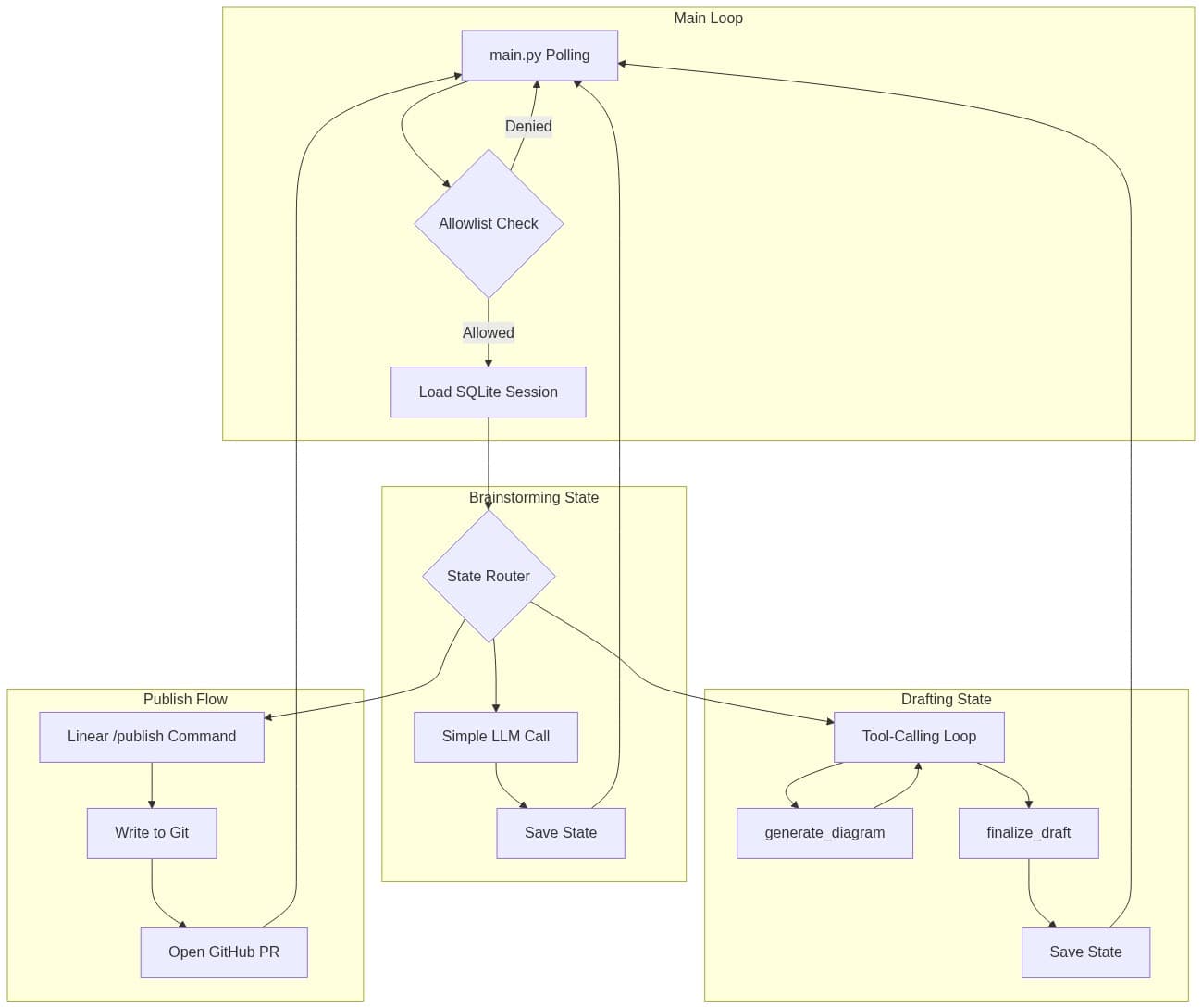
1. The Allowlist Check
Because this bot has write access to my personal blog repository, security is paramount. The very first thing every handler does is check message.from_user.id against an allowlist loaded from ALLOWED_TELEGRAM_USER_IDS. If a stranger messages the bot, the execution halts immediately. It doesn't even hit the database.
2. SQLite Session Loading
Once authorized, the bot loads the user's session. Rather than maintaining state in memory (which would make the bot fragile to restarts), I use a local SQLite database.
Every incoming message triggers a session lookup keyed by chat_id. That row stores:
- The current state:
idle,brainstorming, ordraft_review. - The accumulated conversation history (serialized JSON).
- The draft content (if any).
- A list of pending images (local cache paths under
data/images/<chat_id>/).
After the handler processes the message and gets a response from the LLM, it writes the updated state and history back to SQLite. If the server restarts mid-conversation, the bot resumes exactly where it left off.
The Brainstorming Phase (No Tools, Just Context)
A session starts with /new. That command pulls the target blog repo and loads .blogbot/instructions.md into the session. Those instructions are injected into the drafting prompt later, so the bot stays CMS-agnostic: each blog describes its own frontmatter schema and voice. Without that file, the bot refuses to leave idle.
Once instructions are loaded, the session enters brainstorming. This is a low-friction phase where the LLM acts as a sounding board.
There is no tool-calling loop here. The mechanics are straightforward:
- Append the user's message to the stored conversation history.
- Call the brainstorm-stage LiteLLM model with this history and a system prompt that explicitly instructs: "Understand the user's technical idea, ask clarifying questions, but do not write the draft yet."
- Send the LLM's plain-text response back to the user.
- Save the updated history to SQLite.
If I send a photo during brainstorming or draft review (a whiteboard sketch, a screenshot), the bot downloads the largest size to the local image cache and appends it to pending_images. The LLM is not invoked to "see" the image; we just collect assets for the drafting phase.
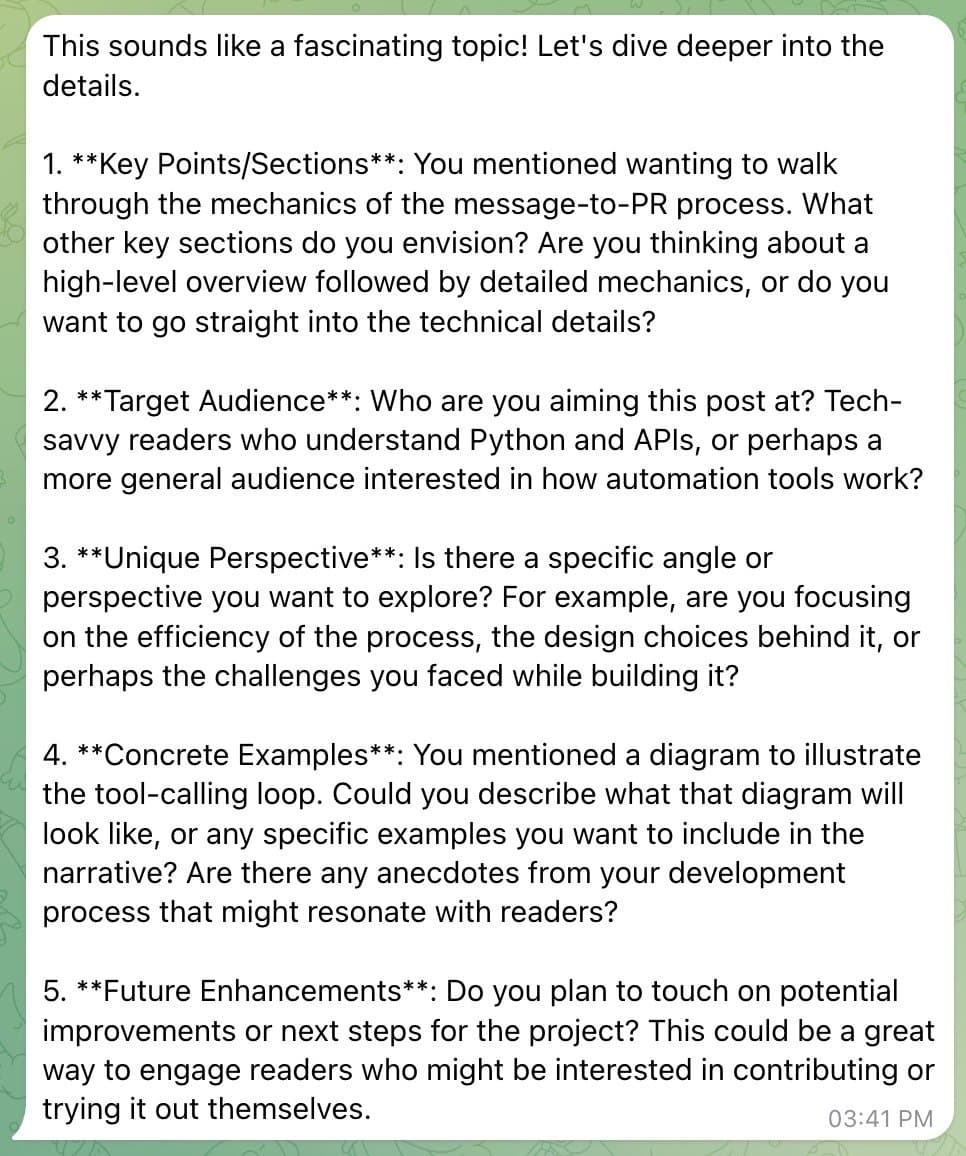
Below is an example of how the agent guides the brainstorming process, asking targeted technical questions to flesh out the post before writing any code:
Note
The screenshot above shows the kind of structured questioning the agent uses to push for technical depth before moving to the drafting stage.
The Drafting Phase & The Tool-Calling Loop
Typing /draft (or sending revision notes while already in draft_review) transitions into the tool-calling loop. Models are configured per stage via env (LLM_MODEL_BRAINSTORM, LLM_MODEL_DRAFT, LLM_MODEL_DIAGRAM), so brainstorming, drafting, and diagram generation can use different providers through LiteLLM.
Instead of relying on the LLM to output raw markdown that I would have to parse with fragile regular expressions, I use structured tool calling. The agent is configured with exactly two tool schemas: generate_diagram and finalize_draft.
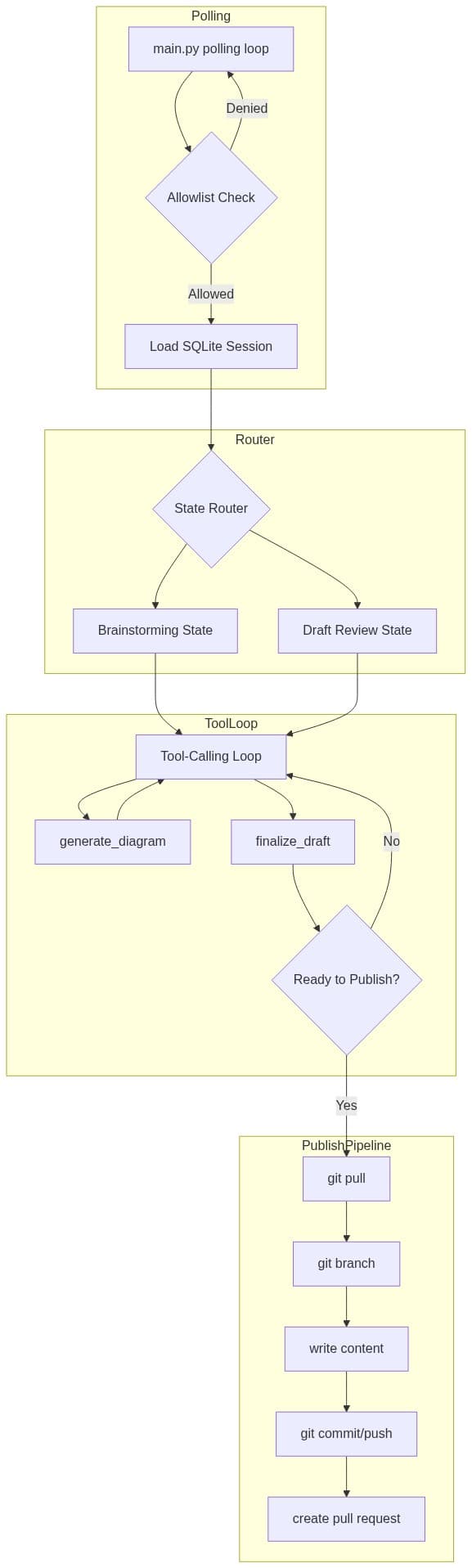
Here is a closer look at how the drafting loop and publish stages connect:
The Tool-Calling Loop Mechanics
When the draft handler fires, it enters a bounded loop (up to 12 rounds):
messages = [
    {"role": "system", "content": draft_system_prompt(...)},
    {"role": "user", "content": brainstorm_transcript_or_revision_notes},
]

for _ in range(max_rounds):
    response = litellm.completion(
        model=config.model_for_stage("draft"),
        messages=messages,
        tools=[generate_diagram_schema, finalize_draft_schema],
    )

    tool_calls = response.choices[0].message.tool_calls
    if not tool_calls:
        # Nudge: plain text is not enough; must call tools
        messages.append({
            "role": "user",
            "content": "You must call finalize_draft (and generate_diagram if needed)."
        })
        continue

    for tool_call in tool_calls:
        name = tool_call.function.name
        arguments = json.loads(tool_call.function.arguments)

        if name == "generate_diagram":
            # 1. Separate diagram-stage LLM turns the description into Mermaid
            # 2. Render PNG via mermaid.ink (retry once with a syntax fix)
            # 3. Store locally and return an opaque token like {{diagram_1}}
            result = handle_generate_diagram(arguments["description"])
            messages.append({
                "role": "tool",
                "tool_call_id": tool_call.id,
                "content": json.dumps(result),
            })

        elif name == "finalize_draft":
            draft = handle_finalize_draft(
                frontmatter=arguments["frontmatter"],
                slug=arguments["slug"],
                body_markdown=arguments["body_markdown"],
            )
            return draft
If the drafting model wants a diagram, it calls generate_diagram with a short description of what the figure should show. A separate diagram-stage model writes Mermaid syntax, then the code renders it to PNG through mermaid.ink. On success, the tool result includes an opaque token like {{diagram_1}}. On failure after one syntax-fix retry, the tool returns an error and tells the model not to embed that token.
The drafting model then calls finalize_draft with structured frontmatter, a kebab-case slug, and body_markdown that may contain {{diagram_N}} / {{image_N}} tokens.
Placeholder Resolution
finalize_draft does not trust the model with file paths. A deterministic post-processing step (prepare_draft_content) runs before the draft is saved:
- Strip any leading YAML frontmatter the model accidentally put in the body (structured
frontmatteris the source of truth). - Replace
{{image_N}}/{{diagram_N}}with portable markdown images using a configurable public URL prefix (BLOG_IMAGES_URL_PATH), for example. - Scrub invented local image markdown that was never produced from a known token.
- Drop or fix cover-image frontmatter keys that point at files we do not have.
Disk layout and URL layout are intentionally separate. Files later land under BLOG_IMAGES_PATH (often public/images/blog on a Next.js site), while the markdown uses BLOG_IMAGES_URL_PATH (often /images/blog). That keeps the agent usable across CMS setups without baking one renderer into the defaults.
# Resolve opaque tokens to site-public markdown images
resolved_body, used_ids = resolve_placeholders(
body_markdown,
slug=slug,
blog_images_url_path=config.blog_images_url_path,
pending_images=pending_images,
)
# e.g. {{diagram_1}} -> The LLM only ever sees abstract tokens. Python owns path hygiene, alt-text truncation, and frontmatter cleanup.
The Publish Pipeline: Pure Mechanics, No LLM
Once I review the draft on Telegram and I'm happy with it, I send the /publish command.
It is tempting to throw LLMs at every stage of an "agent," but the publishing step is a place where LLMs do not belong. Publishing should be 100% deterministic, reliable, and fast.
When /publish is triggered, the bot executes a linear sequence of Git and GitHub API operations:
- Pull: Fetch and fast-forward the repo's default branch (whatever GitHub reports, not necessarily
main). - Branch: Create or reset a branch named
blogbot-<slug>. - Write: Write
BLOG_CONTENT_PATH/<slug>.<ext>with YAML frontmatter + resolved body. Copy only images actually referenced in the body (or a validated cover path) intoBLOG_IMAGES_PATH/<slug>/. - Commit & Push: Commit and push the branch.
- Pull Request: Open a PR with the GitHub REST API using
GITHUB_TOKEN.
The bot then replies with a direct link to the GitHub PR. I can do a quick final review on my phone and hit merge.
The Hardest Part: Blocking Work in a Single Process
The main operational tradeoff of this architecture is that heavy drafting work runs in-process. Because LiteLLM completions and mermaid.ink requests are synchronous httpx calls inside async handlers, a slow round can stall the bot until it returns.
I did not try to make the whole pipeline fully async. Instead I kept the failure modes boring and visible:
- Timeouts:
mermaid.inkrenders use a 30-second HTTP timeout. - One retry, then omit: If rendering fails, a diagram-stage LLM gets one chance to fix the Mermaid syntax. If it still fails, the tool returns an error, the diagram is omitted, and the user sees a short note about which diagrams could not be generated.
- Progress text: Before entering the drafting loop, the bot sends a plain "drafting in progress" message so the chat does not look frozen for no reason.
That is enough to keep a personal, single-user bot usable without turning the project into a distributed job queue.
Future Tool Ideas
While the current setup works well for drafting posts from scratch, I'm planning to expand the agent's capabilities with a few more specialized tools:
- GitHub Repository Ingestion: A tool that accepts a GitHub repository URL, clones it, analyzes the codebase structure, and drafts a system architecture post explaining how the project works.
- Illustrative Image Generation: Beyond technical Mermaid diagrams, a tool that interfaces with a text-to-image model to generate cover images or conceptual illustrations.
- Deep Research Assistant: A tool that uses a search API to pull in external documentation links and verify API details before writing code snippets.
Conclusion
By avoiding heavy agent frameworks and sticking to a simple stack (Python, SQLite, LiteLLM, and Git), I built a reliable, stateful writing assistant as a small modular package rather than a framework maze.
The tool-calling loop lets the drafting model request diagrams and finalize structured content, while SQLite keeps sessions resilient across restarts. Deterministic placeholder resolution and a non-LLM publish pipeline keep the git history clean and the deployments predictable.
If you're building your own LLM-powered utilities, consider starting without a framework. Map out your state transitions, write clean tool schemas, and let simple database rows handle the memory. You might find you don't need much else.